
How to Choose the Right CRM Software for Your Business: Key Features, Costs, and Use Cases
Balancing features, costs, and use cases is crucial when choosing CRM software—discover how to make the best choice for your business growth.
Choosing the right CRM software for your business can feel overwhelming with so many options available. You’ll want to focus on what truly fits your unique needs—whether it’s sales tracking, customer retention, or automation. Costs can vary widely, and the features you choose will directly impact your team’s efficiency and growth potential. But how do you balance these factors without missing what matters most to your operations?
Why Choosing the Right Small Business CRM Matters
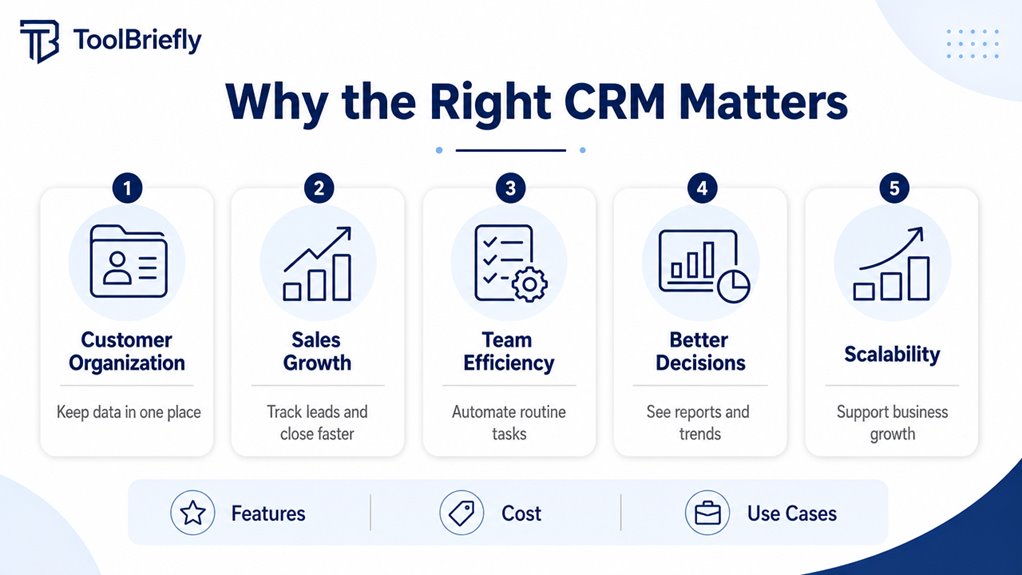
Choosing the right small business CRM can transform the way you manage customer relationships and boost your sales. For small businesses, a CRM isn’t just a tool—it’s crucial for improving operational efficiency and streamlining customer management. You’ll find affordable CRM solutions available that offer important features like contact management and sales pipeline tracking, ensuring you have a clear view of your customer interactions. With the right CRM, you can centralize customer data and reduce the time spent on manual tasks, freeing you up to focus on more strategic activities that drive growth. Investing in a CRM tailored to your business size and needs leads to better insights, higher retention, and improved sales performance. Since 71% of SMBs budget between $35 to $105 monthly for CRM software, you can easily find options that fit your budget without compromising on functionality. Ultimately, selecting the right CRM helps small businesses build stronger relationships and achieve sustainable success.
How to Identify Your Small Business CRM Needs
How do you pinpoint the exact CRM features your small business needs? Start by evaluating your business goals, whether you want to improve sales processes or increase customer retention. Next, examine your current workflows to spot inefficiencies a customer relationship management solution could fix. This step will help you prioritize must-have features. Don’t forget to determine your budget, keeping in mind that small businesses start with solutions typically costing $10 to $80 per user monthly. Considering industry-specific needs also guides your choices during the CRM selection process.
Here’s a quick overview to help you choose the right CRM:
| Step | Focus Area |
|---|---|
| Evaluate your business goals | Improve sales, retention |
| Examine workflows | Identify inefficiencies |
| Determine your budget | $10–$80 per user |
| Prioritize must-have features | Contact management, automation |
These steps guarantee you focus on the features to look for and make an informed decision.
Key Features Every Small Business CRM Must Have
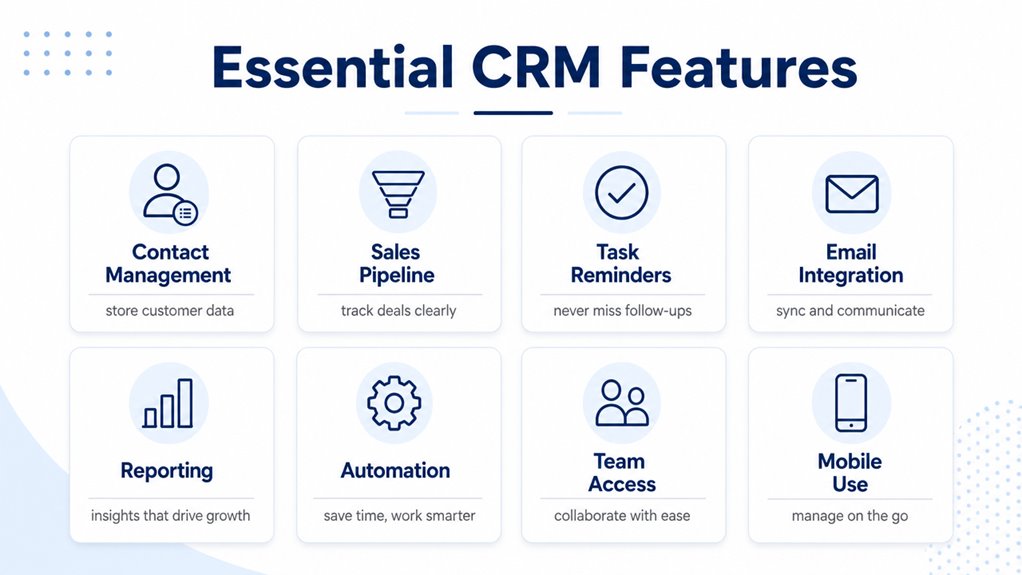
To choose the right CRM, you’ll want features that simplify managing your contacts and keep all customer details in one place. Tracking leads through clear sales pipelines helps you stay organized and close deals faster. Plus, powerful reporting tools give you the insights needed to make smarter business decisions.
Essential Contact Management
Contact management is the backbone of any effective CRM, especially for small businesses aiming to build personalized relationships with their customers. To make the most of your small business CRM, focus on these essential contact management CRM features:
- Centralized customer profiles with detailed interaction history for personalized communication.
- Automated data import to keep contact info accurate and save time on manual entry.
- Integration with existing tools like email and calendars, ensuring smooth workflows and timely follow-ups.
- Robust reporting capabilities that track contact activity, engagement rates, and reminders to refine your strategies.
These elements improve visibility and organization, letting you manage your contacts efficiently and strengthen customer connections. Prioritize these features to boost your CRM’s impact and tailor experiences that keep your customers coming back.
Lead Tracking Tools
One of the most essential features your small business CRM must have is an effective lead tracking tool that lets you visualize every stage of your sales pipeline. This visibility streamlines your sales process, ensuring you act quickly on opportunities. Integrating lead tracking with your CRM solutions centralizes customer information, improving your engagement strategies and supporting better lead management. Automated follow-ups keep you accountable and reduce the risk of losing leads by triggering timely reminders. With data-driven insights, you can identify high-priority leads and tailor nurturing efforts to boost customer retention. Additionally, tracking performance metrics helps you monitor how well your sales funnel performs, enabling ongoing optimization of engagement strategies. Having a CRM with robust lead tracking tools truly transforms how you manage and grow your customer base.
Reporting And Insights
Lead tracking tools give you a clear view of your sales pipeline, but without strong reporting and insights, that data can’t reach its full potential. A customizable CRM with robust reporting and analytics empowers you to make smarter decisions by transforming raw data into actionable insights. Look for these key features:
- Automated report generation to save time and reduce errors.
- Data visualization through dashboards for quick understanding of sales performance.
- Analytics tools that help with forecasting future trends and customer behavior.
- Extensive lead management insights to guarantee no opportunities slip through.
With these capabilities, you’ll improve customer satisfaction by understanding their needs better and optimizing your overall sales process efficiently.
Comparing Top Small Business CRM Platforms
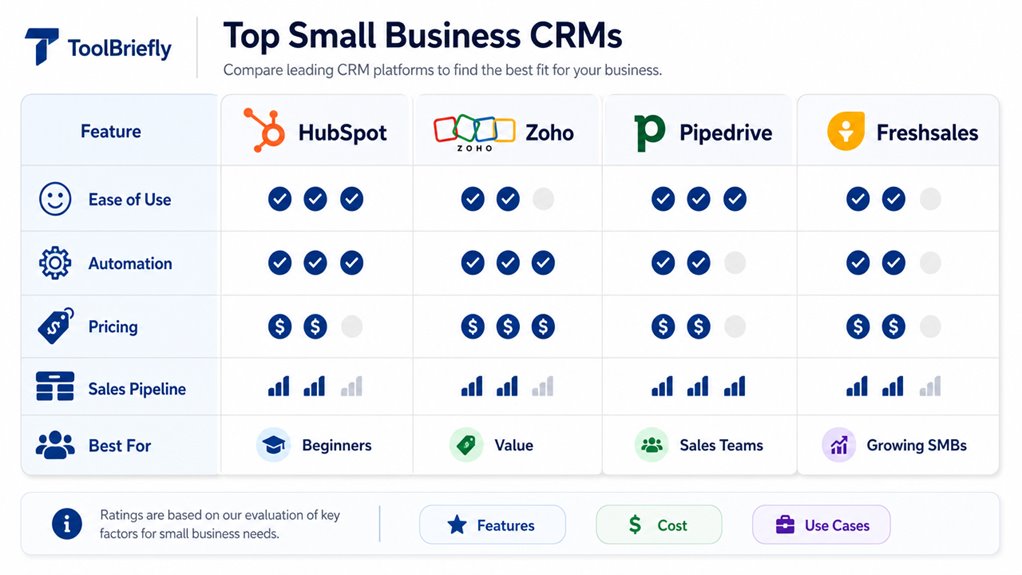
Now that you know the key features to look for, it’s time to compare top CRM platforms based on their features, pricing, and integration options. You’ll want to see which tools fit your budget and work smoothly with your existing systems. This way, you can pick the best CRM that boosts your small business efficiently.
Platform Feature Comparisons
Though choosing a CRM can feel overwhelming, focusing on key features like contact management, pipeline tracking, and integration options will help you find a platform that fits your business workflows. When comparing platforms, evaluate operational, analytical, collaborative, and strategic CRM features to align with your goals. Prioritize ease of use and customization options to guarantee the system adapts to your unique processes.
Here are four essential criteria to assess:
- Contact management and lead pipeline tracking for streamlined customer interactions.
- Reporting capabilities to derive actionable insights.
- Integration options that connect seamlessly with your existing tools.
- Collaboration features supporting team communication and task management.
This structured approach guarantees you pick a CRM that enhances productivity and drives growth.
Pricing Models Overview
Understanding the pricing models of CRM software is key to finding a solution that fits your budget without sacrificing essential features. The average cost of CRM ranges widely, with free CRM options for solopreneurs and entry-level plans starting around $10 per user monthly. Mid-tier CRMs offer enhanced features at $30-$80 per user monthly, while enterprise-tier plans surpass $80 per user monthly, catering to complex needs. Don’t forget hidden costs like data migration and ongoing support, which impact total expenses, especially for small businesses. Here’s a quick overview:
| Pricing Tier | Per User Monthly | Features & Capabilities |
|---|---|---|
| Free Options | $0 | Basic functions, suited for solopreneurs |
| Entry-Level | $10 – $30 | Core CRM features, small teams |
| Mid-Tier CRMs | $30 – $80 | Custom dashboards, AI tools |
| Enterprise-Tier | $80 – $300+ | Extensive customization, advanced support |
| Hidden Costs | Varies | Data migration, implementation, support |
Integration Capabilities Analysis
Integration capabilities are a critical factor when choosing a CRM for your small business, as they determine how well the software connects with your existing tools. Top small business CRMs excel by offering:
- No-code integrations for quick connections with email, social media, and marketing tools, streamlining your workflow.
- APIs that enable custom integrations, allowing you to tailor CRM software to fit your unique business needs.
- Compatibility with e-commerce platforms, simplifying sales tracking and inventory management through centralized data management.
- Integration with communication tools like Slack or Microsoft Teams, enhancing team collaboration and speeding up response times.
These features guarantee your CRM supports lead scoring and smooth workflow management, making your operations more efficient and responsive.
CRM Pricing Guide for Small Businesses
Choosing the right CRM software starts with knowing how much you’re willing to spend. This CRM pricing guide for small businesses highlights key budget considerations. On average, small businesses allocate about $87 per user per month, typically ranging from $35 to $105. Free CRM options suit solopreneurs or tiny teams, offering core functionalities at no cost. Entry-level options generally fall between $10 and $30 per user per month, providing essential tools to get started. If you need more advanced capabilities like customizable dashboards or AI features, mid-tier CRMs priced from $30 to $80 per user per month fit well. While enterprise-tier CRM plans often exceed $80 per user per month and can go beyond $300, they’re best for larger organizations with complex demands. Fortunately, many affordable CRM solutions come with scalable upgrade paths, allowing you to begin with cost-effective options and expand as your business grows.
Advanced Small Business CRM Features That Drive Growth
Advanced CRM features can give your small business a real edge by automating sales tasks, providing predictive insights, and streamlining workflows. These capabilities not only save time but also identify new growth opportunities and improve customer engagement through analyzing customer sentiment.
Here are four key advanced features to evaluate:
- Sales automation and workflow automation speed up repetitive tasks and guarantee your team focuses on high-value activities.
- Predictive insights use AI to forecast sales trends and help prioritize leads more effectively.
- Reporting capabilities deliver real-time performance metrics, giving you a clear view of your sales pipeline health.
- Third-party integrations and tailored functionalities enhance user adoption by connecting your CRM with essential tools and customizing it to your unique needs.
Choosing a CRM with these features guarantees your business stays efficient, growth-focused, and ready to adapt as you scale.
Evaluating CRM Usability and Integration Options
Beyond powerful features, you’ll want a CRM that’s easy for your team to use every day. Usability is key, as a user-friendly CRM with drag-and-drop and customizable dashboards boosts productivity and increases user adoption rates. Accessibility is equally essential—mobile functionality guarantees your team can access the CRM anytime, anywhere.
Integration options matter too. Choose a CRM that smoothly connects with your existing software tools like email and communication apps. No-code integrations simplify setup, letting you focus on your core tasks without heavy IT support.
Here’s a quick overview of what to evaluate:
| Feature | Importance | Benefit |
|---|---|---|
| Usability | High | Increases user adoption rates |
| Mobile Functionality | Important | Enhances accessibility and flexibility |
| Drag-and-Drop | Highly Recommended | Simplifies task management |
| Customizable Dashboards | Valuable | Tailors experience for each user |
| No-Code Integrations | Critical | Eases integration with existing systems |
Make these usability and integration considerations a priority for smoother CRM adoption.
Best Practices for CRM Onboarding
A successful CRM onboarding starts with setting clear, SMART goals that align with your business strategy. When selecting a CRM, use a features checklist to prioritize essential capabilities for different teams, ensuring the system supports your business strategies. A seamless transfer of data is vital, so develop a detailed data migration plan to avoid disruptions. Next, encourage user interaction with the CRM through hands-on usability assessment—this helps identify challenges early on. Finally, continuous collection of user feedback post-launch will let you optimize CRM usage and adapt features as needed. Here are best practices to follow:
- Define SMART goals related to your business needs.
- Create and use a prioritized features checklist during selecting a CRM.
- Implement a robust data migration plan for a seamless transfer of data.
- Conduct usability assessments and gather user feedback to improve CRM onboarding continuously.
Frequently Asked Questions
How to Choose the Right CRM System for Your Business?
To choose the right CRM system, you’ll want to start with CRM vendor evaluation, focusing on customization options and integration capabilities to fit your workflows. Consider user experience and scalability needs so the system grows with you. Don’t forget data security and support services for reliable operation. Conduct a cost-benefit analysis, factoring in the implementation timeline and training requirements to guarantee smooth adoption and ongoing success.
What Are the 7 C’s of CRM?
The 7 C’s of CRM are essential for customer engagement and include Customer, Cost, Convenience, Communication, Collaboration, Customization, and Consistency. They guarantee smooth data integration, boost your sales pipeline, and enhance user experience with mobile access and automation tools. You’ll find lead management, reporting features, and scalability options that fit your business. Consistent customer support rounds it out, helping you build strong relationships and streamline teamwork across departments.
Can Chatgpt Make a CRM?
Yes, ChatGPT can help you create a CRM by supporting chatbot integration and enhancing automation features to streamline tasks. It assists with customer segmentation and data analytics, offering insights through a natural user interface. You can use customizable templates and enjoy mobile access. Plus, its integration options allow scalability, addressing scalability concerns. When considering cost comparison, ChatGPT-driven CRM solutions can be efficient and adaptable for your business needs.
What Are the 4 Types of CRM and How Do You Choose the Right One?
The four types of CRM are Operational CRM (automates sales and service), Analytical CRM (analyzes customer data), Collaborative CRM (enhances teamwork and info sharing), and Strategic CRM (focuses on long-term relationships). To choose the right one, consider if you want a user friendly CRM with strong CRM customization options, cloud based CRM or on premise CRM depending on your needs, plus CRM integration tools. Industry specific CRM might fit best too.