Marketing Automation for Small Businesses: Start Simple Without Losing Personalization
Balancing automation and authenticity can seem tricky, but starting simple lets your small business save time without losing personal touch. Discover how inside.
If you run a small business, you’ve likely wondered how to save time on marketing without sounding like a robot. Marketing automation can feel overwhelming, especially when personalization matters most. But you don’t have to plunge into complex systems right away. Starting with simple tools and strategies lets you maintain genuine customer connections while streamlining your efforts. The real question is: how do you balance automation with authenticity effectively?
Why Marketing Automation Matters for Small Businesses
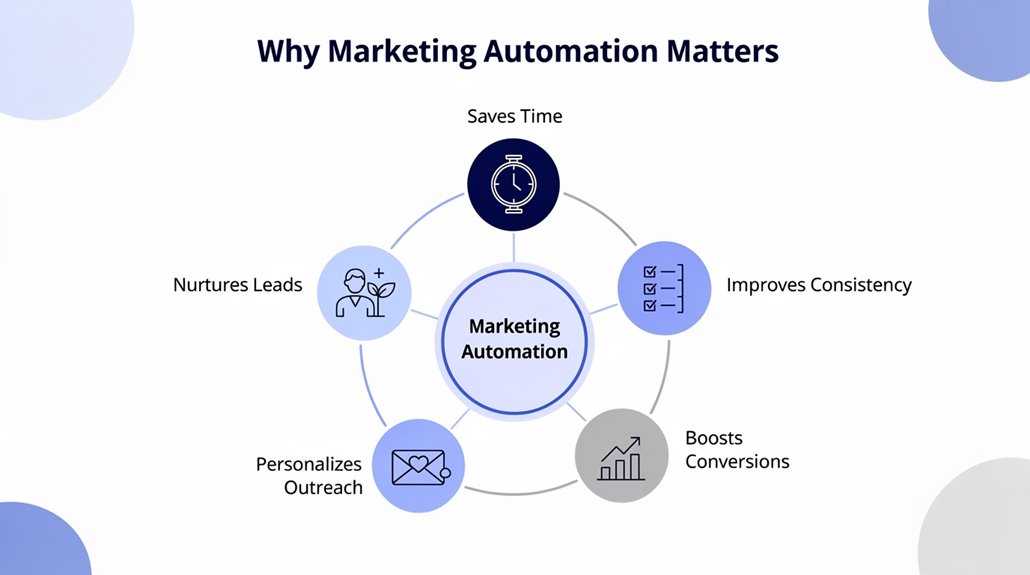
Although small businesses often juggle limited resources, marketing automation can be a game-changer by handling routine tasks like emails and reminders, freeing you to focus on engaging customers and delivering great service. Automation boosts your marketing efforts by streamlining customer interactions, making it easier to maintain consistent communication without feeling overwhelmed. With affordable solutions like Mailchimp and HubSpot, you don’t have to break the bank to implement effective Email Marketing campaigns that raise your qualified leads by impressive margins. Personalized messaging through automation not only attracts prospects but also improves customer retention, helping your business compete against larger companies. By integrating marketing automation, small businesses save time and cut marketing overhead, allowing you to maximize every dollar spent. Ultimately, automation empowers you to nurture leads and foster loyalty without sacrificing the personal touch that keeps your customers coming back. Tools like ActiveCampaign, available starting at just $9/month, provide automated email and revenue attribution features that make professional-grade marketing accessible even on a tight budget. This balance is why marketing automation truly matters for your small business success.
Choosing Marketing Software Based on Ease, Features, and Cost
Choosing the right marketing software boils down to three key factors: ease of use, features, and cost. As small business owners, you want a tool that’s easy to set up and doesn’t require hours of training. Focus on platforms that offer basic email automation and integrate well with your existing systems to streamline customer data management. Also, seek features you’ll never outgrow, like scalable automation options that grow with your business. And most importantly, keep an eye on cost—choose affordable marketing solutions with free or low-cost plans to avoid overspending. Platforms like HubSpot and Zoho CRM are strong starting points, as they offer subscription-based pricing models that let you add users and expand features as your business evolves.
| Factor | What to Look For |
|---|---|
| Ease of Use | Simple interface, minimal training |
| Features | Email, automation for small businesses, CRM integration |
| Cost | Free tiers, budget-friendly subscriptions |
| Scalability | Grows with your customer data and marketing needs |
This balance guarantees you’re choosing the right marketing software that fits your current and future demands.
Affordable Marketing Automation Tools for Small Budgets
Finding the right marketing software that fits your needs and budget is just the first step. For small businesses, choosing affordable marketing automation tools lets you manage email campaigns and CRM without overspending while maintaining customer engagement. Here are some great budget-friendly options offering basic automation features and personalized email workflows:
- Mailchimp: Free plan for up to 500 subscribers, ideal for starting consistent communication.
- Zoho Campaigns: Budget-friendly with a drag-and-drop interface and a free plan for 2,000 subscribers.
- Brevo (Sendinblue): Unlimited contacts, send up to 300 daily emails free, great for essential automation.
- ActiveCampaign: Plans start at $15/month, offering robust automation to boost personalized customer engagement.
These tools help you stay connected and automate marketing efforts effectively while respecting your budget. Affordable marketing automation doesn’t mean sacrificing personalization—it’s about choosing smart, scalable solutions. Platforms like MailerLite also offer a free tier for subscribers up to 1,000 contacts, making it another strong contender for small businesses looking to maximize their budget without compromising on automation features.
Starting Simple With Email Scheduling and Lead Nurturing
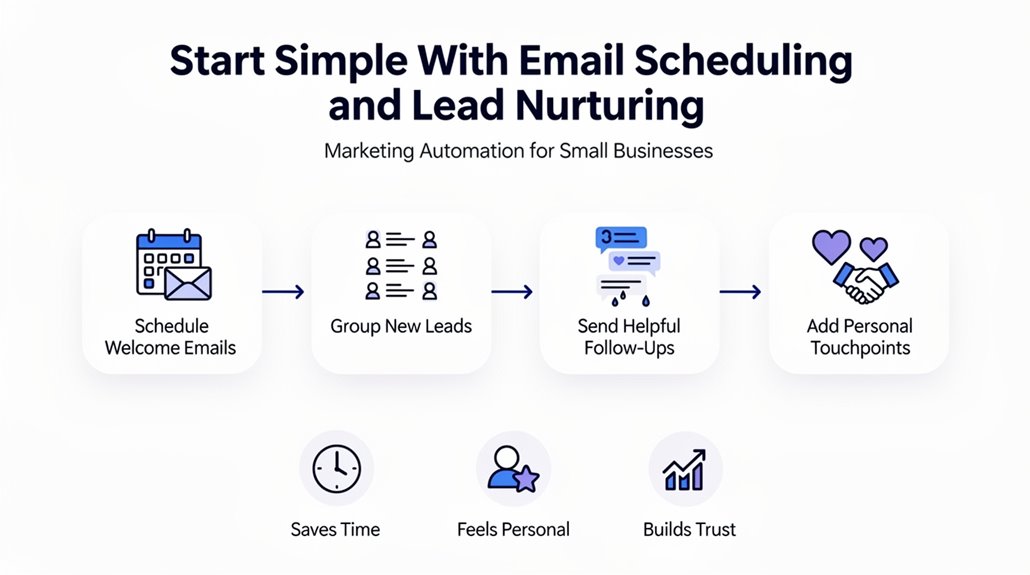
When you start using email scheduling and lead nurturing, you’ll automate timely follow-ups that keep your audience engaged without extra work. Email scheduling lets you plan communications in advance, ensuring consistent touchpoints without added staff. Combining this with lead nurturing enhances customer engagement through personalized emails triggered by actions, which boosts conversion rates. A simple welcome series is a great way to immediately connect with new subscribers, fostering stronger relationships and improved retention. Using marketing automation tools, even with limited resources, you can build simple email workflows tailored to your audience. Monitoring open rates and other metrics then helps refine your messaging and timing for better results. These automated workflows aren’t just efficient—they maintain the personal touch your customers appreciate. Platforms with drag-and-drop email builders allow you to design and deploy these workflows quickly without requiring any technical skills. By starting simple, you lay a strong foundation for more advanced strategies later, ensuring your business grows with meaningful, automated connections that drive success.
Setting Up Basic Automated Workflows
Although setting up automated workflows may sound intimidating, starting with just a few simple triggers like form completions or email sign-ups can streamline your follow-ups effortlessly. By focusing on basic automated workflows, you simplify your marketing while nurturing leads and delivering timely responses that enhance the customer journey. Email automation accelerates follow-up speed and maintains consistent communication without extra effort.
To set up effective workflows, concentrate on:
- Defining clear triggers such as sign-ups or purchases
- Crafting relevant messages tailored to each step
- Scheduling immediate or delayed delivery for better engagement
- Monitoring performance metrics like open and click rates
Keeping your automation needs simple marketing guarantees you don’t overwhelm your setup. This approach balances automation with personalization, helping you manage customer journeys efficiently and optimize results over time. Starting small lets you build confidence and refine your workflows as you grow. Platforms designed to support this process often leverage multi-channel follow-up campaigns across SMS, email, and social platforms to keep leads engaged without adding complexity to your operations.
Automating Personalized Messaging for Clients
Once your basic workflows are in place, you can enhance your marketing by automating personalized messaging that truly connects with your clients. By using marketing automation platforms, you can leverage audience segmentation to send targeted emails based on interests and behaviors. This approach boosts customer engagement, with personalized email open rates increasing by 29% compared to generic messages. Starting with welcome series emails helps build trust early, encouraging customer loyalty from the outset. Personalization techniques like including a recipient’s first name in subject lines can raise click-through rates by 26%, making your outreach more effective. Additionally, automating follow-up messages guarantees timely and relevant communication that keeps customers engaged without feeling impersonal. For small businesses, automating personalized messaging isn’t about losing the human touch but enhancing it—allowing you to foster stronger relationships and maintain engagement efficiently while scaling your marketing efforts.
Combining Email, SMS, and Social Media for Wider Reach
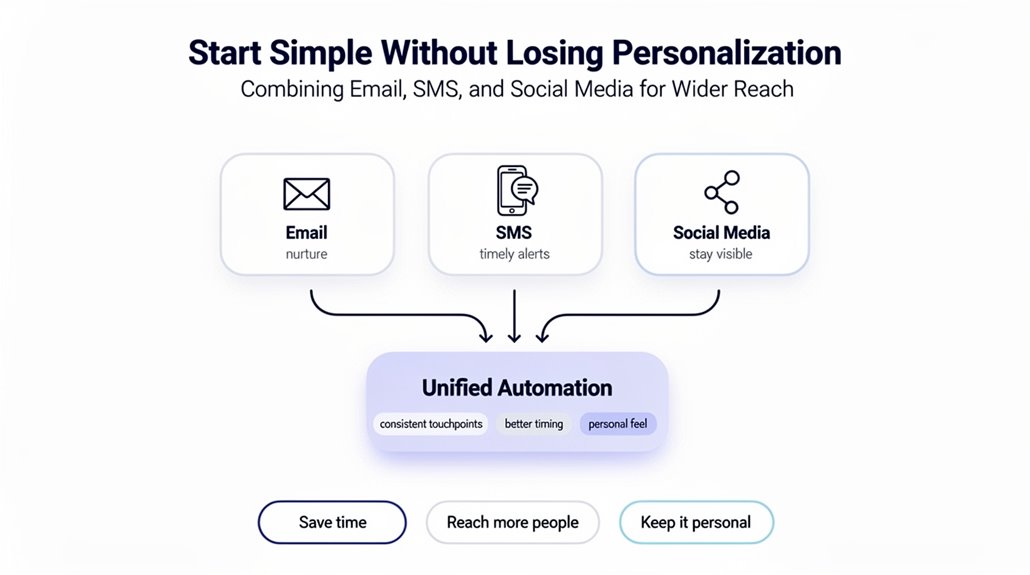
You can boost your reach by synchronizing email and SMS campaigns through a single platform, ensuring your message stays consistent. Scheduling posts on social media lets you maintain an active presence without constant effort. Using multi-channel engagement tools helps you connect with customers wherever they prefer, increasing your chances of making sales.
Synchronizing Email And SMS
When you combine email and SMS marketing, you tap into multiple channels that boost your chances of engaging customers by up to 40%. For small businesses, synchronizing these channels using marketing automation tools guarantees your campaigns stay personalized and timely, maximizing customer engagement. Here’s why it works:
- SMS complements email by sending quick reminders and exclusive offers, benefiting from a 98% open rate.
- Coordinated campaigns across email and SMS keep your brand message consistent and memorable.
- Analyzing combined channel data helps you tailor follow-ups based on customer behavior.
- Tools like Mailchimp or HubSpot streamline your workflow, allowing easy management without losing the personal touch.
Social Media Scheduling
Three key channels—email, SMS, and social media—can create a powerful marketing trifecta when scheduled and synchronized effectively. Social media scheduling helps you maintain consistent messaging across platforms, boosting brand recognition and engagement. Automation helps small businesses streamline sending emails, social media posts, and SMS, targeting your contact list with personalized customer experiences. Using automation tools for small businesses like Hootsuite or Buffer, you can effortlessly plan campaigns within a multi-channel approach, increasing conversion rates by up to 50%.
| Channel | Benefit | Example Use Case |
|---|---|---|
| Detailed content delivery | Newsletters & promotions | |
| SMS | Quick, attention-grabbing | Event reminders & flash sales |
| Social Media | Broad audience engagement | Scheduled social media posts |
| Multi-channel | Consistent messaging | Cross-promotion boosts participation |
| Automation Tools | Save time, personalize messages | Sync campaigns, track engagement |
Multi-Channel Engagement Tools
Countless small businesses benefit from multi-channel engagement tools that automate and synchronize messaging across email, SMS, and social media. By leveraging automation software for small businesses, you can save time while maintaining personalized messaging and a consistent brand presence. These tools boost customer interaction and improve customer engagement metrics, driving more effective marketing campaigns. Key features include:
- Coordinated email and SMS blasts with higher click-through rates
- Social media posting schedulers to manage content across platforms efficiently
- Automated replies on Messenger for instant, 24/7 customer support
- Unified dashboards for analyzing customer engagement metrics and campaign success
Using multi-channel engagement tools means wider reach without extra effort, enhancing customer retention and ensuring your brand stays top-of-mind across multiple channels.
Measuring and Improving Your Marketing Automation Results
Tracking performance is essential if you want to get the most out of your marketing automation. Measuring key metrics like email performance, lead generation, and conversion rates helps you pinpoint what’s working and what needs improvement. Use built-in analytics tools to monitor these metrics and adjust your automation workflows accordingly. Personalization also plays a big role—A/B testing different subject lines or content formats can boost engagement considerably. Regularly reviewing audience segmentation guarantees you’re targeting the right people, increasing your campaign’s effectiveness.
Here’s a quick reference table to guide your efforts:
| Focus Area | Improvement Strategy |
|---|---|
| Email Performance | A/B test subject lines and content |
| Conversion Rates | Adjust automation workflows |
| Lead Generation | Use precise audience segmentation |
Frequently Asked Questions
How Do I Integrate Marketing Automation With My Existing CRM System?
To integrate marketing automation with your CRM, start with system compatibility checks to guarantee smooth CRM integration. Clean up your CRM data to avoid syncing issues and use data synchronization tips to keep info current. Choose the right automation tool based on your needs, considering third-party integrations. Optimize workflows to enhance user experience, implement lead scoring methods for better targeting, and set up custom reporting solutions to track results effectively.
Can Marketing Automation Help Improve Customer Retention Rates?
Yes, marketing automation can boost your customer retention rates by enhancing customer loyalty. Using retention strategies like personalized emails and automated surveys, you create feedback loops that keep customers engaged. Customer segmentation lets you tailor messages based on behavior, while engagement metrics guide proactive outreach. Win back campaigns revive lapsed customers, and subscription models foster ongoing relationships. Together, these tools guarantee you maintain strong connections and keep customers coming back.
What Are Common Mistakes to Avoid When Starting Automation?
When starting automation, you should avoid common pitfalls like strategy misalignment and tool overload. Don’t neglect segmentation or overlook your audience, as these hurt engagement. Ignoring metrics and inadequate testing can leave issues unnoticed. Lack of personalization and poor integration with existing systems make your efforts ineffective. Also, relying too much on automated responses can feel impersonal. Focus on clear goals, test thoroughly, and keep your audience in mind.
How Do I Ensure Compliance With Data Privacy Laws in Automation?
To guarantee compliance with data privacy laws, you need strong data security and clear consent management. Use automation tools to implement GDPR compliance by collecting explicit user consent through opt-in forms. Always inform consumers about their rights in your privacy policies and avoid data breaches by securing stored information. In email marketing, make certain subscribers can easily withdraw consent. Prioritizing transparent communication helps protect you and respects your audience’s privacy.
What Training Resources Are Best for Small Business Marketing Automation?
You’ll find the best training resources include online webinars and hands-on workshops that let you learn actively. Look for user-friendly tools paired with expert guides and thorough eBooks to get the theory down. Video tutorials and case studies show real-world applications, while community forums help you share best practices and get support. Together, these resources make mastering marketing automation manageable and personalized for your small business needs.