
7 Best CRM Management Software Platforms to Consider in 2026
Imagine streamlining your sales and customer management with the 7 best CRM platforms of 2026—discover which one suits your business perfectly.
Choosing the right CRM software can make a significant difference in how you manage customer relationships and sales processes. With so many options available, it’s important to find a platform that aligns with your business size and goals. Whether you’re a small startup or a large enterprise, understanding the strengths of each CRM will help you make a more informed decision. Let’s explore what the top choices offer and how they might fit your needs.
Top CRM Platforms to Compare in 2026
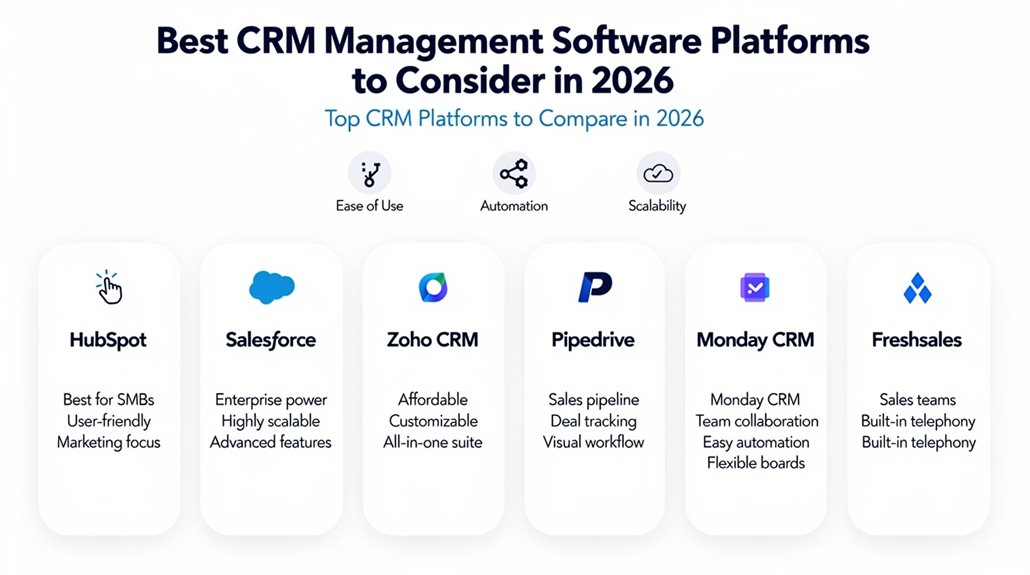
While plenty of CRM platforms will be available in 2026, you’ll find HubSpot and Zoho CRM are top picks for small businesses thanks to their affordability and ease of use. These platforms deliver vital customer relationship management tools with a clean user interface and customizable features that suit your growing needs. If sales pipeline management is key for you, Pipedrive stands out by visually tracking your deals and leads, streamlining your sales process. For enterprises, Salesforce and Microsoft Dynamics 365 remain top CRM options, offering advanced integration capabilities and robust sales and marketing automation to handle complex workflows. The best CRM software now blends automation features powered by AI to boost efficiency and personalize customer interactions. Plus, subscription-based pricing guarantees flexibility and ongoing support. Whether you’re a small business or a larger operation, evaluating CRM platforms based on user interface, scalability, and automation is vital to find the right fit in 2026.
Key CRM Features That Boost Customer Relationships
You need CRM features that streamline your workflow and keep your customer data organized for personalized interactions. Automation and sales pipeline management save you time while helping you focus on the right leads. Integrations with your current tools guarantee every customer touchpoint is connected and efficient.
Essential CRM Capabilities
Because managing customer relationships effectively requires more than just storing contact information, CRM platforms come equipped with essential features designed to streamline your processes and boost engagement. These include automation tools and workflow automation to handle routine tasks, letting you focus on meaningful customer interactions. With contact management and Sales Pipeline Management, you can manage customer data effortlessly and track deals in real-time. Collaboration tools also enable your team to work together seamlessly, improving decision-making and efficiency. Plus, advanced reporting capabilities provide insights that help refine your strategy.
| Feature | Benefit | Impact |
|---|---|---|
| Automation Tools | Streamline tasks | Boosts productivity |
| Contact Management | Centralized customer data | Enhances personalized service |
| Sales Pipeline Management | Visual deal tracking | Improves closing rates |
Enhancing Relationship Management
Although managing customer data is fundamental, enhancing relationship management means leveraging advanced CRM features that go beyond simple storage. To truly enhance customer connections, you need tools like automation features that enable timely follow-ups and personalized communications, boosting engagement and satisfaction. Visual sales pipelines give you clear insights into each stage of customer interactions, helping your team spot bottlenecks and optimize relationship-building efforts. Collaboration tools streamline communication across departments, ensuring effective customer service management and customer support. Plus, integrating CRM with marketing and support systems provides a holistic view that sharpens personalization. By combining these elements, you’ll not only improve your daily interactions but also foster long-term customer loyalty, making your relationship management smarter and more impactful.
Best CRMs for Sales Pipeline Management
Five top CRM platforms stand out for sales pipeline management, each offering unique features to help you track leads, automate tasks, and prioritize prospects. These best CRM tools are designed to streamline your sales process, making lead tracking and deal management more efficient for sales teams.
- Pipedrive: Visual sales pipeline tailored for easy lead tracking and deal progression.
- HubSpot CRM: Thorough deal pipeline management with sales automation and progress tracking.
- ActiveCampaign: Advanced lead scoring and automation to help sales teams prioritize leads effectively.
- Copper: Seamless integration with Google Workspace for managing pipelines and communications effortlessly.
- Freshsales: Predictive contact scoring and deal management tools to focus on high-engagement prospects.
How Top CRMs Use Marketing Automation to Grow Your Business
Once you’ve optimized your sales pipeline, the next step is to amplify your marketing efforts through automation. Top CRM platforms like ActiveCampaign and HubSpot use marketing automation to streamline and personalize customer interactions, boosting engagement and retention. With automated workflows and segmentation features, tools such as Pipedrive reduce manual tasks, making your marketing efforts more efficient. CRMs like Freshsales leverage predictive contact scoring to prioritize leads most likely to convert, improving lead conversion rates. Meanwhile, Brevo integrates multiple marketing channels — email, SMS, chat — helping you nurture leads throughout their journey. Keap stands out by combining CRM with behavior-based automated campaigns, targeting consumers more effectively to increase sales. By adopting these marketing automation capabilities in your CRM, you can deliver tailored experiences that resonate, improve engagement, and ultimately grow your business.
Seamless App Integrations to Streamline Your CRM Workflow
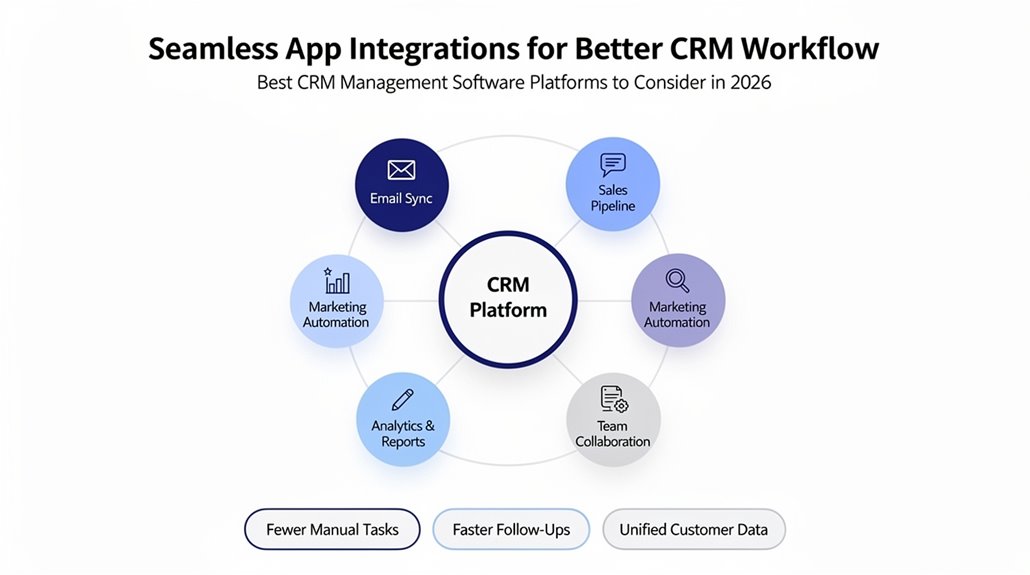
You’ll want a CRM that easily integrates with popular apps like Slack, Mailchimp, and Zapier to keep your workflow smooth and efficient. These connections let you share data in real time, cutting down on manual tasks and errors. With seamless integrations, you can customize your dashboards and automate processes tailored to your business needs.
Integration With Popular Apps
How can integrating your CRM with popular apps transform your daily workflow? When you connect CRM software like HubSpot or Salesforce with essential tools, you enable seamless data sharing and enhanced productivity. Integration with marketing automation tools allows you to run targeted campaigns effortlessly, while syncing with eCommerce tools keeps customer data accurate and up-to-date. Customization options in platforms such as Zoho CRM let you tailor these connections to fit your unique business processes. This approach fosters better team collaboration and cuts down on manual errors, streamlining customer interactions and workflows.
- Boost data accuracy through automatic syncing
- Enhance team collaboration with unified platforms
- Customize workflows to match business needs
- Connect with marketing automation tools for targeted leads
- Integrate eCommerce tools to optimize customer journeys
Enhancing Workflow Efficiency
Releasing seamless app integrations can dramatically boost your CRM workflow efficiency by automating routine tasks and centralizing essential data. Many CRM solutions like HubSpot and Freshworks offer powerful integration capabilities that connect your sales, marketing, and customer service apps effortlessly. This automation of routine tasks improves your data management, guaranteeing centralized access to customer information and analytics. By integrating with eCommerce and marketing tools, you can streamline customer interactions and refine your marketing strategies for better results. Even cost-effective CRM platforms such as Act! provide these benefits, allowing you to maximize functionality without overspending. With enhanced integration capabilities, you’ll improve user experience, reduce manual work, and guarantee your CRM workflow runs smoothly, making your business operations more efficient and connected than ever before.
CRM Pricing Plans for Small, Medium, and Large Businesses
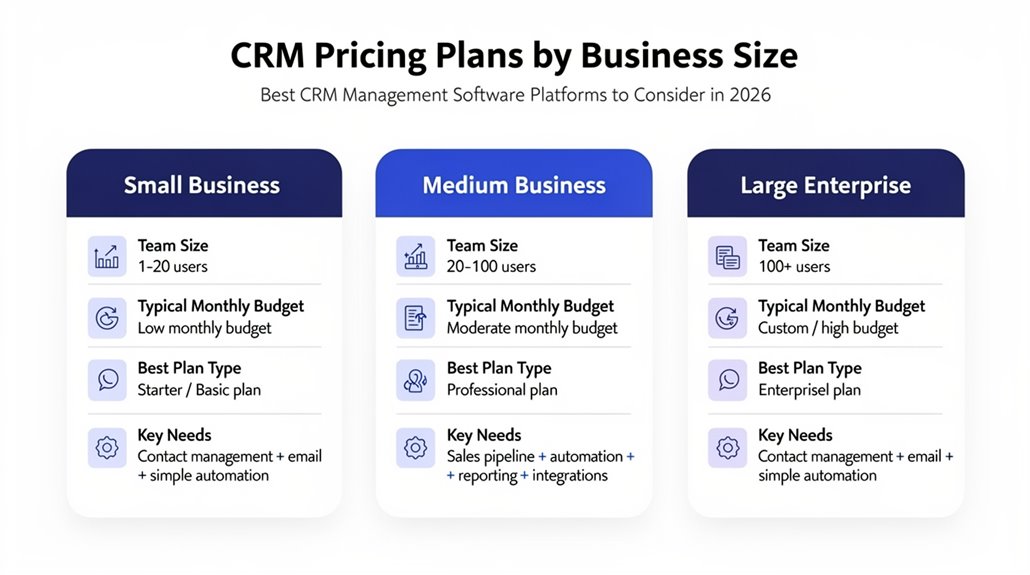
Since budget constraints and feature requirements vary widely, choosing the right CRM pricing plan depends heavily on your business size. If you’re running a small business CRM, you’ll find budget-friendly options like HubSpot and Zoho CRM starting between $0 and $19 per user per month, covering essential customer relationship management features. Medium-sized firms often lean toward platforms such as Insightly and Freshsales, priced from $29 to $99, delivering advanced functionalities and seamless integrations. For large enterprises, CRM pricing plans like Salesforce and Microsoft Dynamics 365 range from $25 to $500 per user monthly, accommodating extensive customization needs. Subscription-based pricing models typically offer scalable subscriptions, so you can expand your user base and features without hefty upfront payments, though be mindful of implementation costs, especially for complex systems.
- Small business CRM: cost-effective, basic features
- Medium-sized firms: advanced functionalities, integrations
- Large enterprises: high customization, broad pricing range
- Scalable subscription: adjust as you grow
- Implementation costs: important for complex setups
How to Choose the Best CRM for Your Team’s Growth
Although selecting the right CRM can feel overwhelming, focusing on your team’s unique needs will simplify the process. Start by evaluating existing workflows to identify areas where a CRM could streamline tasks and boost customer relationships, especially for your customer service teams. Consider scalability carefully—choose a platform that adapts as your organization grows, handling more users and data effortlessly. Examine integration capabilities to guarantee smooth connections with your current marketing tools and other software, improving overall efficiency. User-friendliness is key; opt for a CRM with an intuitive interface and strong support to help your team adopt it quickly. Finally, analyze pricing structures thoroughly, factoring in upfront costs, potential hidden fees, and how the solution fits within your team’s budget. Balancing these elements guarantees you pick a CRM that supports both immediate needs and long-term growth, making your investment worthwhile.
Frequently Asked Questions
How Secure Is Customer Data Within These CRM Platforms?
Customer data within these CRM platforms is generally very secure because they use strong data encryption and strict access controls to protect your info. They implement user authentication and maintain audit trails to monitor activity, reducing risks from cyber threats. With cloud storage and regular data backup, your data stays safe even during disruptions. Plus, these platforms follow compliance standards and security protocols, often leveraging threat intelligence to stay ahead of potential vulnerabilities.
Can CRM Software Be Customized for Niche Industries?
Yes, CRM software can be customized to fit niche industry solutions through CRM customization options that offer tailored functionalities and industry specific features. You’ll want to assess integration capabilities and scalability considerations to guarantee smooth growth. Think about user experience design and budget constraints when planning deployment strategies. Don’t forget to use customer feedback channels to refine the system continuously, making certain it perfectly suits your unique business needs.
What Training Resources Are Available for New CRM Users?
You’ll find plenty of training resources for new CRM users, including user onboarding, training webinars, and online tutorials to get you started quickly. Many platforms offer detailed user guides, video courses, and certification programs to deepen your skills. Community forums let you connect with others, sharing best practices and troubleshooting tips. For hands-on experience, some provide workshops alongside ongoing support, ensuring you feel confident using the CRM long term.
How Do CRMS Handle GDPR and Privacy Compliance?
CRMs handle GDPR regulations by integrating consent management and enforcing strict privacy policies to protect your data. They use data encryption and user access controls to secure information, while audit trails and compliance reports help monitor adherence. Training requirements guarantee you and your team stay informed. They also manage data retention periods and carefully vet third party integrations to maintain compliance, making it easier for you to meet legal obligations without hassle.
Are There Mobile CRM Apps for On-The-Go Access?
Yes, many CRM platforms offer mobile functionality, so you can stay productive on the go. You’ll appreciate seamless cloud synchronization and offline access, ensuring data’s available even without internet. Device compatibility and performance speed keep your experience smooth. Notification alerts help you stay updated, while customization features and integration options enhance usability. User feedback often praises the intuitive user experience, making mobile CRMs essential for flexible, efficient management anytime, anywhere.