
Mailchimp Email Marketing Review: Features, Automation Limits, and Best-Fit Businesses
Unlock the potential of Mailchimp’s user-friendly tools and discover its automation limits—find out if it’s the perfect fit for your business needs.
If you’re looking for an email marketing tool that balances ease of use with solid features, Mailchimp might catch your attention. You’ll find plenty of templates and straightforward campaign building, but its automation capabilities have some limits worth noting. Whether your business needs simple drip campaigns or more advanced segmentation, understanding these factors is key before deciding if Mailchimp fits your marketing goals.
Key Mailchimp Email Marketing Features
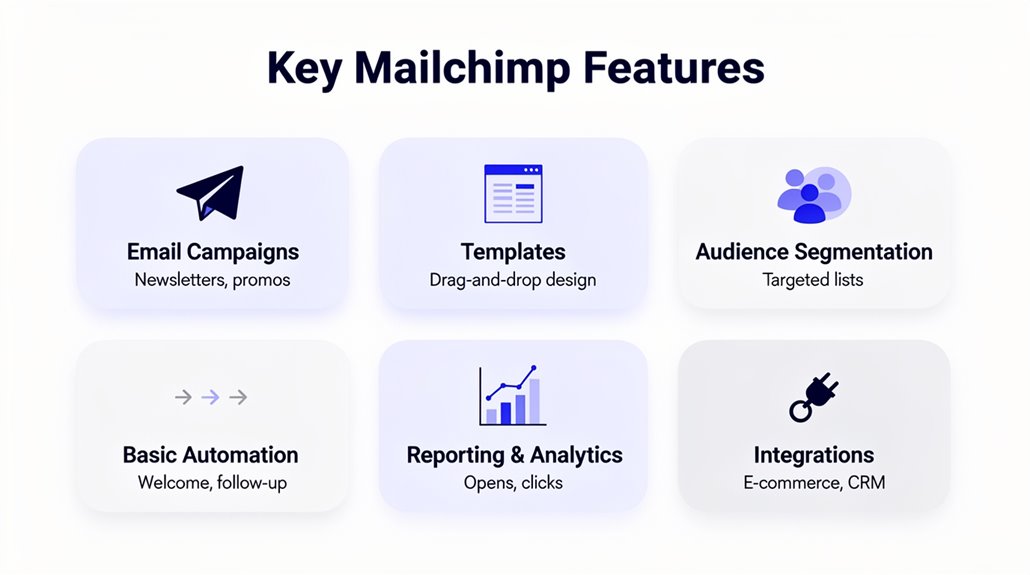
While Mailchimp offers a user-friendly email campaign builder with mobile-responsive, drag-and-drop templates, it’s the platform’s automation and AI features that truly set it apart. When you create email marketing campaigns, Mailchimp provides over 130 templates designed for various business needs, so you can quickly build professional campaigns without design expertise. Its extensive audience management tools let you use segmentation based on demographics, purchase history, and engagement levels, ensuring your messages hit the right targets. Thanks to automation features triggered by 50+ user actions, you can send personalized emails that feel timely and relevant. Plus, Mailchimp’s AI-powered dynamic product recommendations boost engagement by tailoring content to individual preferences. This combination means you’re not just sending bulk emails—you’re delivering tailored, impactful communications that resonate, making Mailchimp a robust choice to manage and grow your audience effectively. For businesses looking to expand beyond email, tools like ActiveCampaign and HubSpot offer multichannel automation capabilities that extend customer engagement across SMS and social media as well.
Mailchimp Automation: Features and Limitations
How can automation elevate your email marketing efforts with Mailchimp? Mailchimp automation helps you create personalized experiences using over 50 behavior-based triggers. With its visual automation builder, you can design workflows through intuitive flowcharts, making complex workflow design accessible even if you’re new to automation. Whether you’re setting up a welcome series, abandoned cart reminders, or post-purchase follow-ups, the automation capabilities simplify your tasks.
While Mailchimp’s automation features are user-friendly and effective for basic automation needs, they don’t match the advanced options found in specialized platforms like ActiveCampaign. If you’re on a premium plan, you can access predictive segments, which boost automation effectiveness and have the potential to drive twice as much revenue. Platforms like Klaviyo and Drip offer automated abandoned cart emails specifically designed to recover lost sales, making them strong alternatives for e-commerce businesses with more advanced needs. Overall, Mailchimp automation is ideal if you want straightforward, dependable automation without steep learning curves, but might feel limiting if you need highly advanced or customized automation workflows.
Mailchimp Personalization and Segmentation Tools
Personalization and segmentation are at the heart of effective email marketing, and Mailchimp gives you powerful tools to tailor your campaigns precisely. With Mailchimp personalization, you can leverage over 50 behavior-based triggers that respond to customer actions, ensuring your messages resonate. Advanced segmentation helps you zero in on high-purchase potential customers, boosting engagement by sending targeted messages that feel relevant. Mailchimp’s audience management features simplify organizing your contacts through tagging and grouping, enabling more refined tailored messaging strategies. You can insert customizable mail merge tags to personalize email content with names or other personal details, adding a human touch. Dynamic content options allow you to include product recommendations tailored to each recipient’s behavior and interests, enhancing campaign effectiveness. Altogether, these tools empower you to craft email campaigns that connect on a deeper level, making your marketing smarter and more impactful without extra hassle.
Growing Your Business With Mailchimp
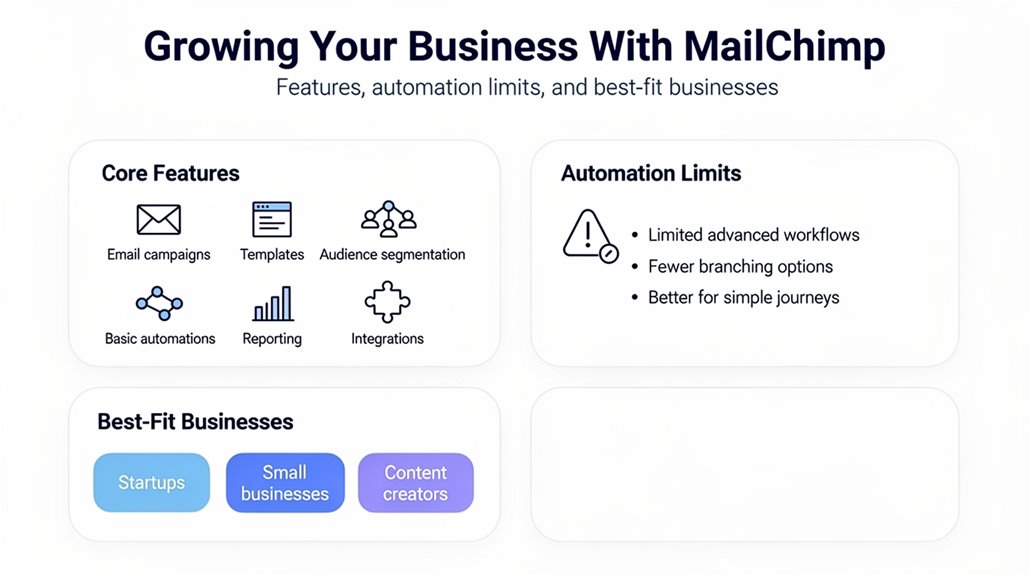
You can scale your email campaigns effortlessly with Mailchimp’s intuitive tools and automation features. By engaging your audience through targeted content and timely messages, you’ll boost customer interaction and loyalty. These capabilities make growing your business more efficient and impactful.
Scaling Email Campaigns
Although scaling your email campaigns can seem intimidating, Mailchimp makes it straightforward to grow your business without needing advanced technical skills. Its user-friendly marketing platform offers pre-built templates and dynamic content options that ease the process. With automation and advanced segmentation tools, you can efficiently manage expanding customer data and tailor campaigns to specific audience segments. Mailchimp’s predictive segmentation identifies high-potential customers, boosting your conversion rates as your email list grows. Leveraging a multi-channel approach by combining email and SMS campaigns also increases engagement, with users seeing a 58% higher click rate. Plus, Mailchimp’s deliverability rate above 99% guarantees your messages reliably reach your audience, making it easier to scale your email campaigns successfully and sustain consistent engagement.
Enhancing Audience Engagement
Growing your email list is just the start—keeping your audience engaged is what truly drives business growth. With Mailchimp, you can boost audience engagement through personalized campaigns powered by over 50 behavior-based triggers that reach customers when they’re most likely to act. Automation tools help identify who’s ready to buy or may churn, enhancing customer retention. Advanced segmentation lets you tailor your messages to high-purchase potential groups, increasing relevance and response. Combining email marketing with SMS campaigns can raise your click rate by 58%, amplifying your impact. If you’re on a paid plan, A/B testing allows you to optimize emails using data-driven insights, ensuring your content resonates. Mailchimp’s features make it easier to keep your audience connected and grow your business effectively.
Mailchimp Integrations With CRM and Apps
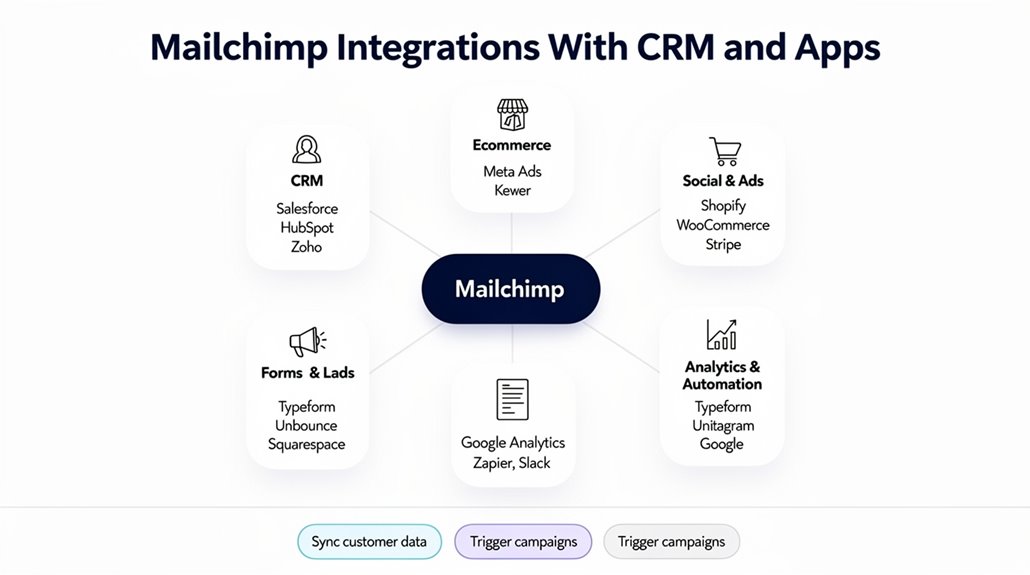
When managing your marketing efforts, Mailchimp’s ability to integrate seamlessly with over 300 apps, including major CRM platforms like Salesforce and HubSpot, can save you time and simplify data syncing. These integrations let you effortlessly sync customer data, enhancing audience management by allowing you to segment audiences based on CRM interactions directly within Mailchimp. The Shopify integration specifically helps automate campaigns using purchase history and behavior, making your automation campaigns more targeted and effective. Plus, importing contacts from CSV files or other platforms streamlines onboarding and centralizes your contacts for better marketing strategies. Mailchimp also connects with social media accounts, so you can coordinate email marketing services with social posts, all from one dashboard. These robust integrations not only boost efficiency but also deepen your insight into customer behavior, empowering you to tailor your marketing strategies and keep your audience engagement strong. Connecting Mailchimp with tools like Slack enables real-time data sharing, reducing manual tasks and keeping your team aligned on campaign performance and customer interactions.
Measuring Mailchimp Campaign ROI and Performance
Many Mailchimp users see an impressive return on investment, with some achieving up to 30 times their spend by maintaining high deliverability and targeting their campaigns effectively. Your email marketing efforts will greatly benefit from using predictive segments, which can double revenue compared to basic targeting. Incorporating multi-channel marketing—combining email and SMS—also boosts click rates by 58%. Don’t overlook abandoned cart emails; they’re essential for recovering lost sales and improving overall campaign performance. Regularly cleaning your email list and authenticating your domain further strengthen deliverability and reduce the risk of campaigns being flagged as spam.
Here’s a quick look at key performance metrics to help you gauge campaign ROI:
| Metric | Typical Value |
|---|---|
| Deliverability Rate | 99% |
| Open Rates (E-commerce) | 29.81% |
| Click Rates (E-commerce) | 1.74% |
| Click Rate Increase (Multi-channel) | +58% |
Tracking these metrics keeps your campaigns sharp, ensuring you maximize ROI and continually improve your marketing strategy.
Mailchimp Support, Onboarding, and Resources
Mailchimp makes it easy to get started and stay supported with expert help available around the clock for Essentials, Standard, and Premium users. Thanks to responsive Mailchimp support via email and chat—with typical replies in 5-10 minutes during business hours—you won’t be left waiting when issues arise. If you’re on Standard or Premium plans, you’ll benefit from personalized onboarding that eases your shift onto the platform. Beyond direct customer service, you have access to rich resources like a detailed knowledge base, step-by-step tutorials, and active community forums to troubleshoot and optimize your campaigns. The free trial lets you explore features by sending up to 10,000 emails without a credit card, helping you get hands-on experience with email marketing strategies before committing. Whether you need initial guidance or ongoing support, Mailchimp’s extensive onboarding and resources are designed to help you overcome challenges and boost your email marketing success.
Mailchimp Pricing, Plans, and When to Upgrade
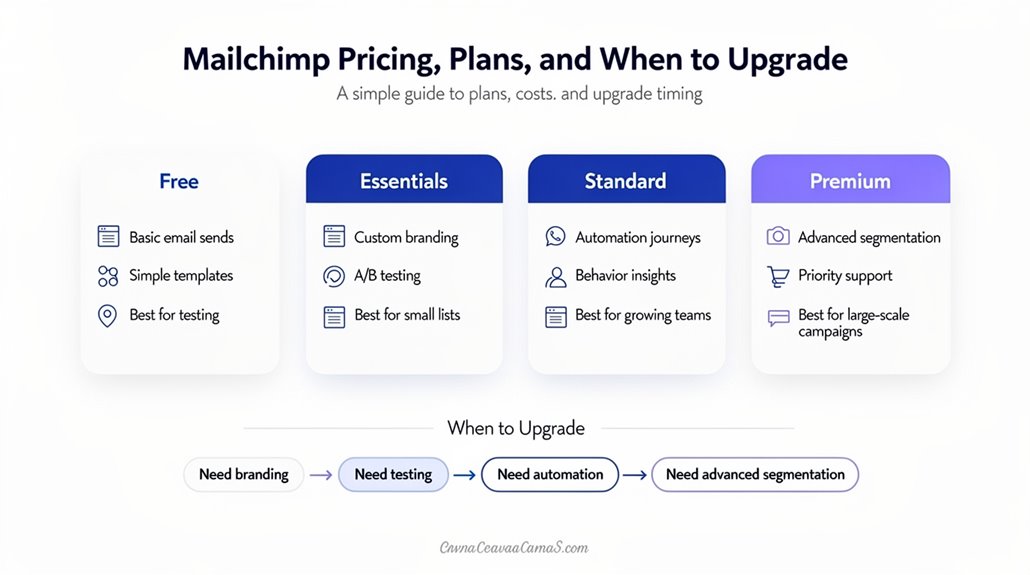
Mailchimp offers several plans, starting with a free option that suits small businesses with basic needs. As your contact list grows or you want advanced features like automation and A/B testing, upgrading becomes important. Knowing when to move up can help you make the most of your email marketing budget and tools.
Plan Options Comparison
Choosing the right email marketing plan can make a big difference in how effectively you reach your audience. Mailchimp’s plan options comparison reveals pricing tiers that grow with your business needs. The Free plan supports up to 500 contacts, perfect for startups. The Essentials plan, starting at $13/month, removes branding and offers A/B testing to refine your efforts. At $20/month, the Standard plan adds advanced automation features, ideal for enhancing your email marketing strategy. For complex needs, the Premium plan at $350/month provides advanced tools and top-tier customer support.
Here’s a quick summary:
- Free plan: basic sends, ideal for small lists
- Essentials plan: expanded email sends, branding removal
- Standard and Premium plans: automation features, advanced tools, priority support
Upgrade Timing Guidance
While you might find the Free plan suitable at first, you’ll want to contemplate upgrading as your contact list grows or your marketing goals become more complex. Mailchimp’s pricing tiers accommodate different stages of growth, starting with the Free plan for 500 contacts and basic features. When your subscriber base expands or you need advanced features like enhanced automation, A/B testing, and predictive analytics, upgrading to the Standard plan is ideal. If you’re frequently running into limitations or require top-tier capabilities, the Premium plan offers scalable solutions for larger businesses. Don’t forget, to fully leverage SMS marketing—even during the Free Trial—you’ll need to add a credit card, and SMS fees may prompt an upgrade. Knowing the right upgrade timing guarantees your campaigns stay effective and aligned with your needs.
Frequently Asked Questions
What Is the 80 20 Rule in Email Marketing?
The 80/20 rule in email marketing means you’ll get 80% of your open rates and click rates from 20% of your audience. Focusing on audience segmentation and content personalization helps target that top group. You’ll want to A/B test subject lines and optimize campaign timing for better engagement metrics. Paying attention to list growth and mobile optimization guarantees you keep reaching the right people effectively without overwhelming them.
What Are the Features of Mailchimp Automation?
Mailchimp automation features let you create automated workflows and drip campaigns with ease through a user-friendly interface. You can set triggered emails based on subscriber actions and personalize messages using advanced audience segmentation. Campaign scheduling keeps your emails timely, while A/B testing helps optimize performance. Plus, integration possibilities with other tools expand your reach. Performance analytics give you insights to refine your strategy, making your email marketing more effective and targeted.
What Is the 60 40 Rule in Email Marketing?
The 60/40 rule in email marketing means you’re focusing 60% of your content on valuable, relevant info and 40% on promotions. This balance boosts subscriber engagement by improving content relevance, which helps with audience targeting and campaign personalization. When you apply email segmentation and A/B testing alongside click-through analysis, you can optimize open rates and deliverability. Following this rule supports list growth and guarantees your emails connect meaningfully with your audience.
What Are Mailchimp’s Best Features?
Mailchimp’s best features let you master user segmentation and template customization, so your campaigns truly connect. You’ll love the detailed campaign analytics and reporting insights that boost audience engagement. A/B testing helps you optimize messaging, while social media integration expands your reach. With landing pages, mobile optimization, and strong deliverability rates, your emails look great everywhere and land in inboxes consistently, making your marketing smarter and more effective.